
ESBM
Working platform · recorded demonstration
Track changing event costs from the first spreadsheet through billbacks, credits, final invoices and closeout — while preserving the source behind every recovery decision.
ESBM demonstration
Event Spreadsheet & Billback Management
Follow the money without losing the source.
ESBM helps event teams track changing vendor costs from the first spreadsheet through billbacks, credits, vendor documents, final invoices, and closeout — while preserving the exact source record behind each recovery decision.
Built for real event operations, ESBM works with the spreadsheets, contracts, invoices, and support documents teams already use. It shows what changed, helps the operator decide what should become a billback or credit, and carries that decision forward through final reconciliation and saved history.
Spreadsheets, invoices, contracts, and other readable support.
Original baseline and later vendor revisions stay identifiable.
Billbacks and credits stay connected to the source that created them.
Save Event, Export Backup, Open Saved Event, and Version History preserve the record.
See ESBM follow one event from the first spreadsheet through final closeout.
The recorded demonstration shows the complete workflow: versioned spreadsheets, source changes, billbacks, credits, vendor documents, standalone recovery, final invoices, closeout, saved history, and the built-in beginner tutorial.
What ESBM can do
A working control system for changing event costs.
ESBM is not just a spreadsheet viewer. It is designed to carry a changing vendor record from the first working document through recovery decisions and final closeout.
Track spreadsheet changes
Version Control
Compare later vendor spreadsheets against the accepted working baseline and isolate what changed. ESBM keeps the earlier version visible so the operator can see the movement instead of working from memory.
Create billbacks and credits
Recovery Management
Turn an approved cost change into an exact billback or credit without losing the relationship to the source row that created it.
Review vendor documents line by line
Document Review
Read invoices and other support as working documents. Decide which amounts another party should pay while the vendor-side document remains intact.
Create standalone billbacks
Supported Recovery
Create an operator-supported billback from a contract, invoice, or other evidence even when there is no spreadsheet change behind the recovery.
Reconcile vendor final invoices
Final Reconciliation
Match the vendor final invoice against the earlier vendor record, identify a difference when one exists, and preserve the approval decision through closeout.
Save, reopen, export, and preserve history
Event History
Save profiles and completed events, review Version History, export a backup copy, reopen saved work, and keep the working record intact.
How the workflow works
From first spreadsheet to final closeout without breaking the trail.
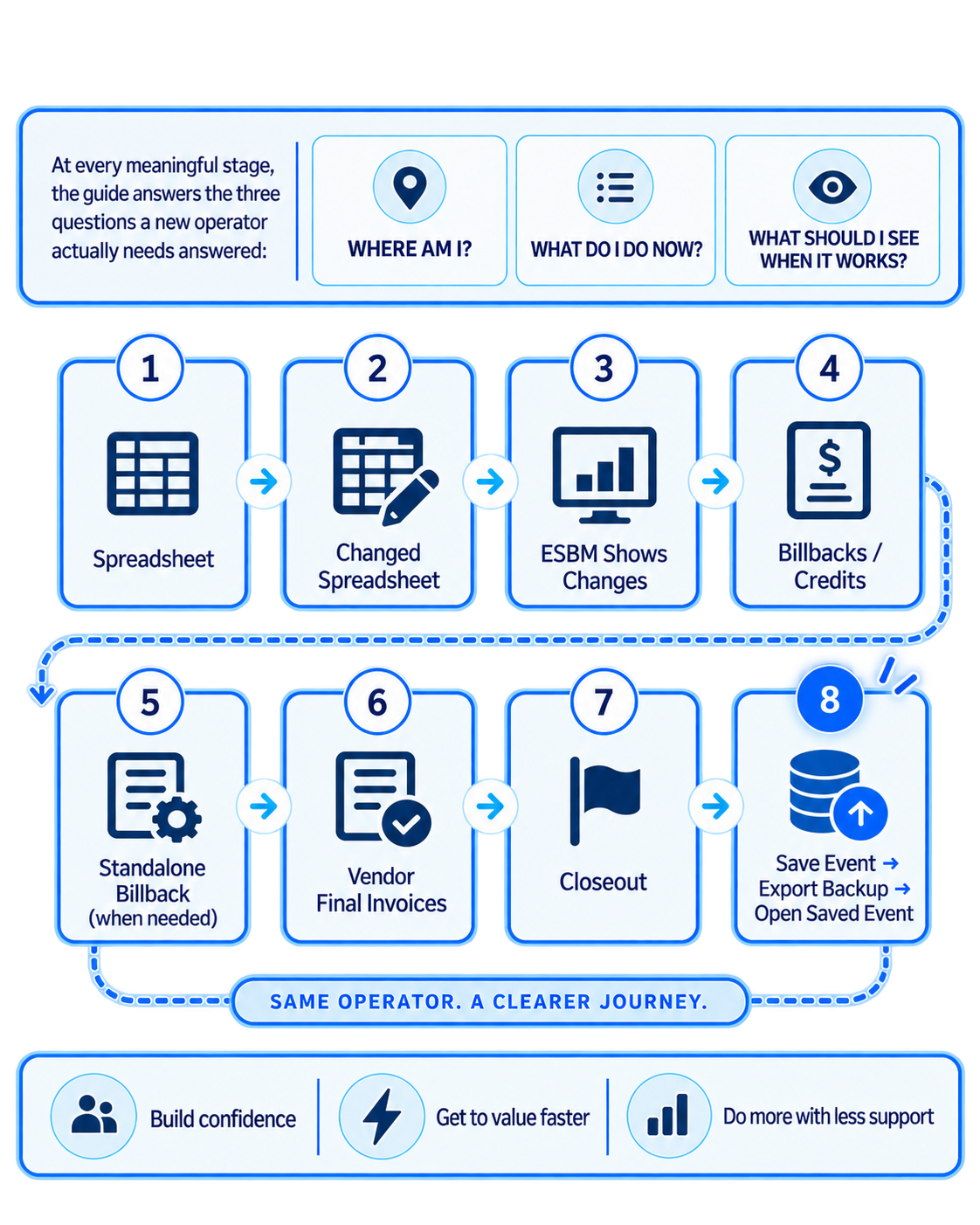
The operator works in Source. ESBM compares, records, and carries forward the decisions that matter. The documents stay recognizable, the recovery stays explainable, and the closeout stays connected to the work that came before it.
Create the event record first, then save immediately so later spreadsheet work is protected.
ESBM establishes the Original Baseline and the first Current Working Spreadsheet.
Load revised vendor spreadsheets as the event develops. ESBM keeps the versions in chronological order.
Changed rows are brought into Change Review & Allocate so the operator can accept, hold, reject, or recover the change.
When another party should pay, create the billback from the exact source relationship. If a later version reverses that cost, apply the credit to the same billback.
Use invoices and other support to create billbacks only for the amounts another party should pay.
If the recovery is legitimate but no spreadsheet change created it, build a standalone billback with supporting evidence.
Load the vendor final invoice and compare it with the earlier vendor-side record. Approve it when the vendor difference is resolved.
Final Closeout checks what is still open and identifies any genuine unresolved condition before completion.
Save the completed event, export a backup copy, close ESBM, reopen it, and verify the restored event and history.
Complete beginner tutorial built into the real program
Learn ESBM by doing the actual work.
The beginner tutorial is inside ESBM itself. It uses real sample files and the real Source tabs, controls, billbacks, credits, vendor documents, final invoices, closeout, Save Event, Export Backup, and Open Saved Event. It does not replace the work with a simulation.
Capture the operating plan, capacities, timing, space, costs and support requirements.
Load the first Temporary Structures spreadsheet and confirm the baseline before accepting it as current.
Load later spreadsheet versions so ESBM can compare each revision against the accepted working state.
Work the actual Change Review & Allocate cards and make the operator decision for each change.
Create billbacks from exact source changes and confirm the recovery appears in the internal billback total.
When a later spreadsheet removes a previously recovered item, apply the exact credit back to the related billback.
Load the Waste Services source document and review each document line independently.
Create a supported billback that is legitimate even though no spreadsheet change created it.
Load and approve the Temporary Structures and Waste final invoices after each reconciles to a $0 vendor-side difference.
Confirm no real unresolved work remains and mark the event complete.
Save the complete event record and export the backup copy.
Reopen the saved work and verify the current spreadsheet, billbacks, historical credit, final invoices, Version History, and Complete status were restored.
What the operator can see
The trail remains visible while the event changes.
These are real screens from the working ESBM platform. They show different parts of the same operating story rather than separate marketing examples.
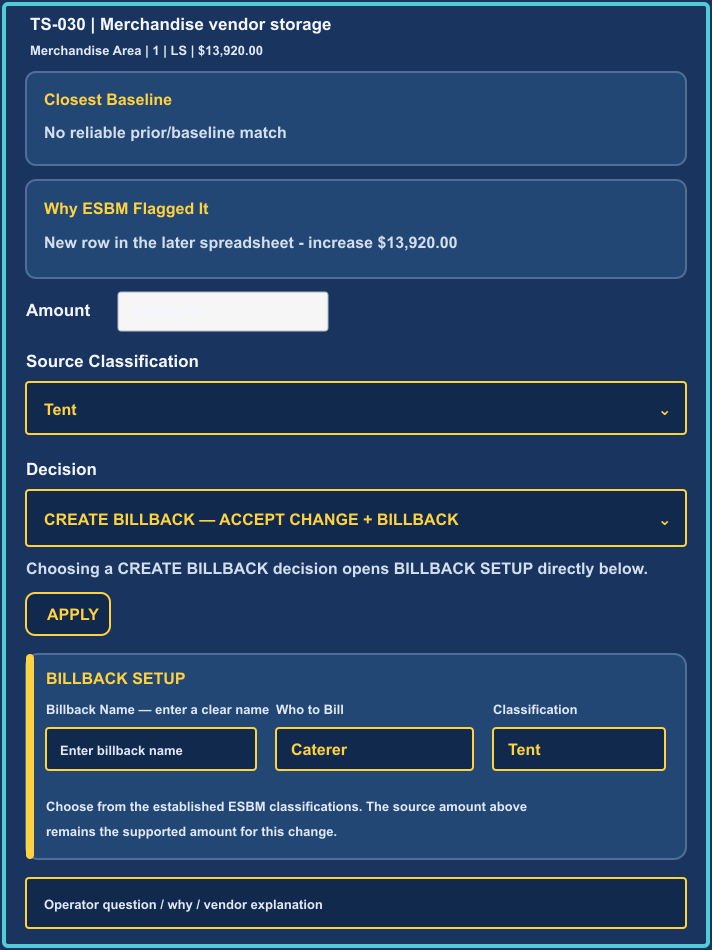
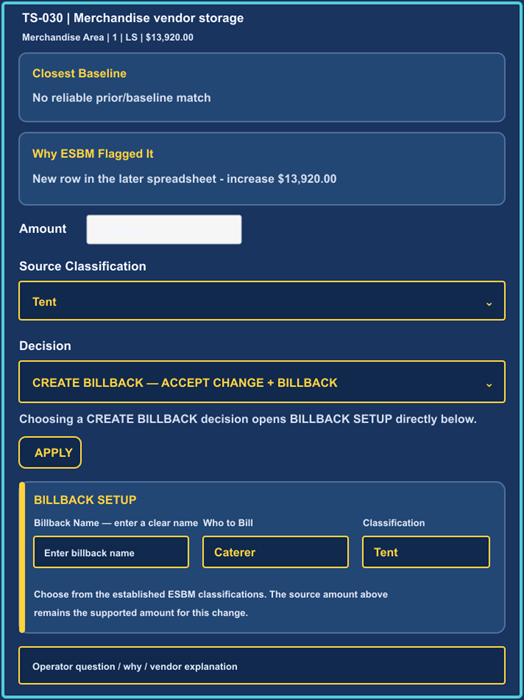
Change Review & Allocate
Review a changed vendor line in context and decide whether it is accepted with no billback, held, rejected, or turned into a source-based recovery.
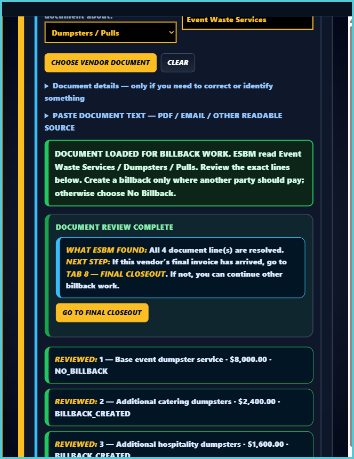
Vendor document review
Review invoices and other support line by line. Only the amounts another party should pay become billbacks; the vendor-side document remains intact.
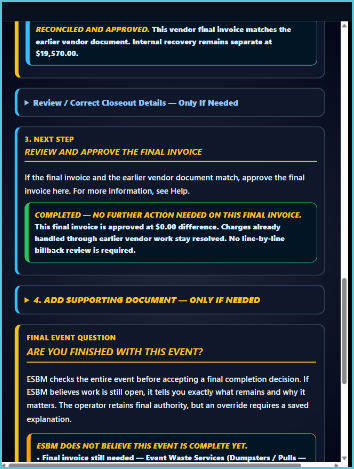
Final vendor invoice and closeout
Reconcile each vendor final invoice against the earlier vendor record, identify any remaining difference, preserve the approval, and keep internal recovery separate.
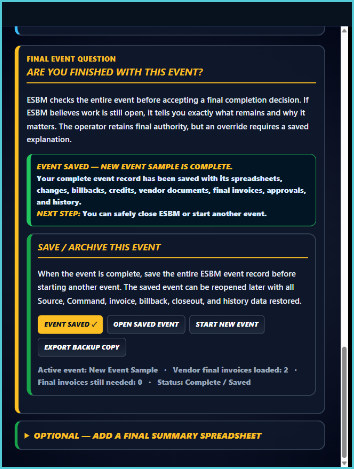
Saved completed event
Save the full event record, export a backup, reopen the saved work, and verify that spreadsheets, billbacks, credits, vendor documents, approvals, and history return with the event.
A critical financial distinction
Vendor payable and internal recovery are not the same number.
ESBM keeps the vendor-side obligation separate from the internal amounts that may be recovered from another party. A billback does not reduce what the vendor is owed; it creates a separate recovery trail.
What the vendor is owed
Vendor-side record
The spreadsheet, invoice, and final vendor reconciliation remain vendor-side accounting evidence.
What another party should repay
Internal recovery record
Billbacks and credits are tracked separately, with the source relationship preserved through closeout.
Why it matters
Changing event costs create financial risk when the story gets separated from the documents.
When revisions, explanations, recovery decisions, and final invoices live in different places, teams can lose track of why a cost changed, who should pay, whether a credit was captured, and what was finally approved.
Keep approved billbacks and later credits visible instead of relying on memory or disconnected notes.
Carry the reason for the recovery with the source record that created it.
See what changed, what was recovered, what was credited, and whether each vendor final invoice reconciled.
Save and reopen the event so the reasoning survives after the immediate event team moves on.
How ESBM can help you
Different users need different answers from the same event record.
Know what changed and what to do next.
Operators
The spreadsheet, invoice, and final vendor reconciliation remain vendor-side accounting evidence.
See the financial consequences as the event evolves.
Event management
Understand which revisions matter, which recoveries are open, and what still needs attention before closeout.
Receive a clearer recovery and closeout record.
Finance / reconciliation
Follow billbacks, credits, final vendor invoices, and approvals without reconstructing the event from scattered files.
Keep the knowledge after the event ends.
Organizations
Preserve a documented history that can be reopened, reviewed, exported, and used to understand how the event was financially managed.